Sort Job Postings to Highlight a Vacancy
This document is meant to help you understand the sort order that AppliTrack will use to display a list of job postings to applicants. Additional instructions regarding Job Postings are available in the online documentation at: ""Using the System"/"Job Postings"/"Overview".
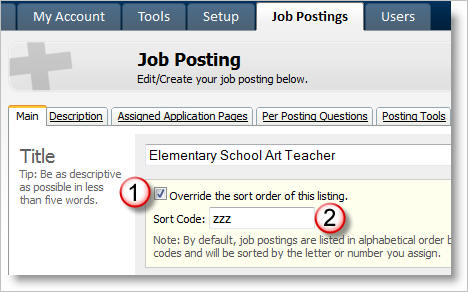
Sorting the list of open job postings is possible through the use of an option called “Override the sort order of this listing.” which appears just below the “Title” field in the Job Posting (fig. 1, #1.) When enabled, the “Sort Code” value of this setting (fig. 1, #2) will allow you to position the posting at the top, bottom, or within the list of postings visible to applicants.
Figure 1: Main tab of Job Posting. Setting a Sort Code of "zzz" will make this posting appear at the bottom of the posting list.
When overriding a posting’s sort order, it is important to understand the context in which the job posting will be seen by applicants. Typically, applicants will come across the list of postings while browsing the "Employment" or "Job Opportunities" section of your public website. In this situation the default sort order of postings is based on the following attributes:
That is: when a Sort Code value is provided, that value will take priority over all others. If no Sort Code exists, or a posting's Sort Code is identical to another, then the postings are ordered by Job Type, then specialty.
From figure 1, the value of Sort Code is "zzz"; Position Type is "Maintenance/Custodial"; Position Specialty is "Custodial Substitute". Because sorting priority is given to the Sort Code value, the posting in figure 1 will most likely appear at the bottom of any list of postings.
To force a posting to appear first in the list of postings, set the Sort Code value to "aaa".
It is important to know that applicants will have the ability to re-order your list of postings based on their interest (e.g., posting date, location, etc.)
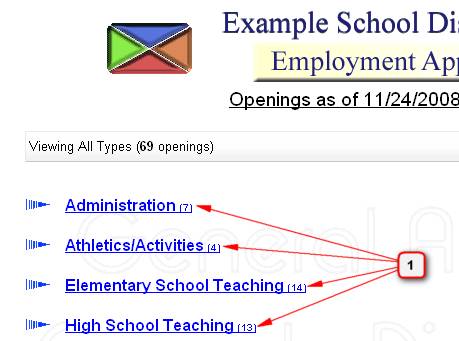
Note: When there are more than 5 open job postings, applicants will first be presented with a list of job types (categories) to narrow the list of possible postings in their view (fig. 2, #1.) The list of job types will always sort alphabetically – it is not possible to change the ordering of the categories. Once a job type is clicked the applicant will be presented with the list of postings for that category, sorted according to the rules described above.
Figure 2: List of job types appear when there are more than five open postings